- Once upon a time, a german, called Björn Ischo, found that his "tray bar" was too full of icons, and that it was interesting to gather some utilities in one alone. So, he created Tray HQ.
|
It is the swiss knife of the Windows desktop
|
- Left and right clicks on the icon :

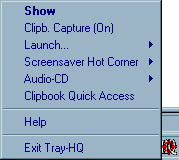
- Tray HQ gives :
- a text file opened with a notepad, for instance to remember what you have to do (it appears by left click on the tray icon and you may modify and save),
- a calendar, with notes by day,
- a clipboard capture, for all thing copied, or by using collections of texts;
- a calculator,
- a stop timer,
- an address list (with URL and e-mail launched),
- a control of Audio CD,
- a hot-corner to launch the screen saver,
- a box to execute programs.
- All these things don't replace the best utilities dedicated to each task, because there are some limitations. However, if you may use regularly at least 2 or 3 options, it is an interesting software. Myself, I use the 4 first fonctions, listed above.
- The program may work in a little window, above the others, in a corner of the screen, and it is an important quality.
- Attention : the version 1.61 has some annoyances in the use of the Notepad. At first, keep care to not use the tabulation (all behind a tabulation, in a line, is lost). Then, the correspondence between the text of the NotePad (saved - why ? - in the file windows/trayhq.ini) and the corresponding .txt file needs to do himself the saves.
- To get Tray HQ, see the page Shareware of Björn Ischo.
